
Computing cluster
This article summarizes how to deal with problems related to computing clusters to quickly locate the causes and complete repairs.
Problem 1: In Standalone mode, the spark service is installed by default and the node cannot be activated.
View Zhiqingyun service log
cd /opt/zhiqingyun/logs
tail -f zhiqingyun.log
View Zhiqingyun node logs
cd ~/zhiqingyun-agent/logs
tail -f zhiqingyun-agent.log
Problem 2: The job submission status is always stuck SUBMITTED
Visit http://localhost:8081
Check whether the spark service has worker nodes activated. It is normal as shown below.
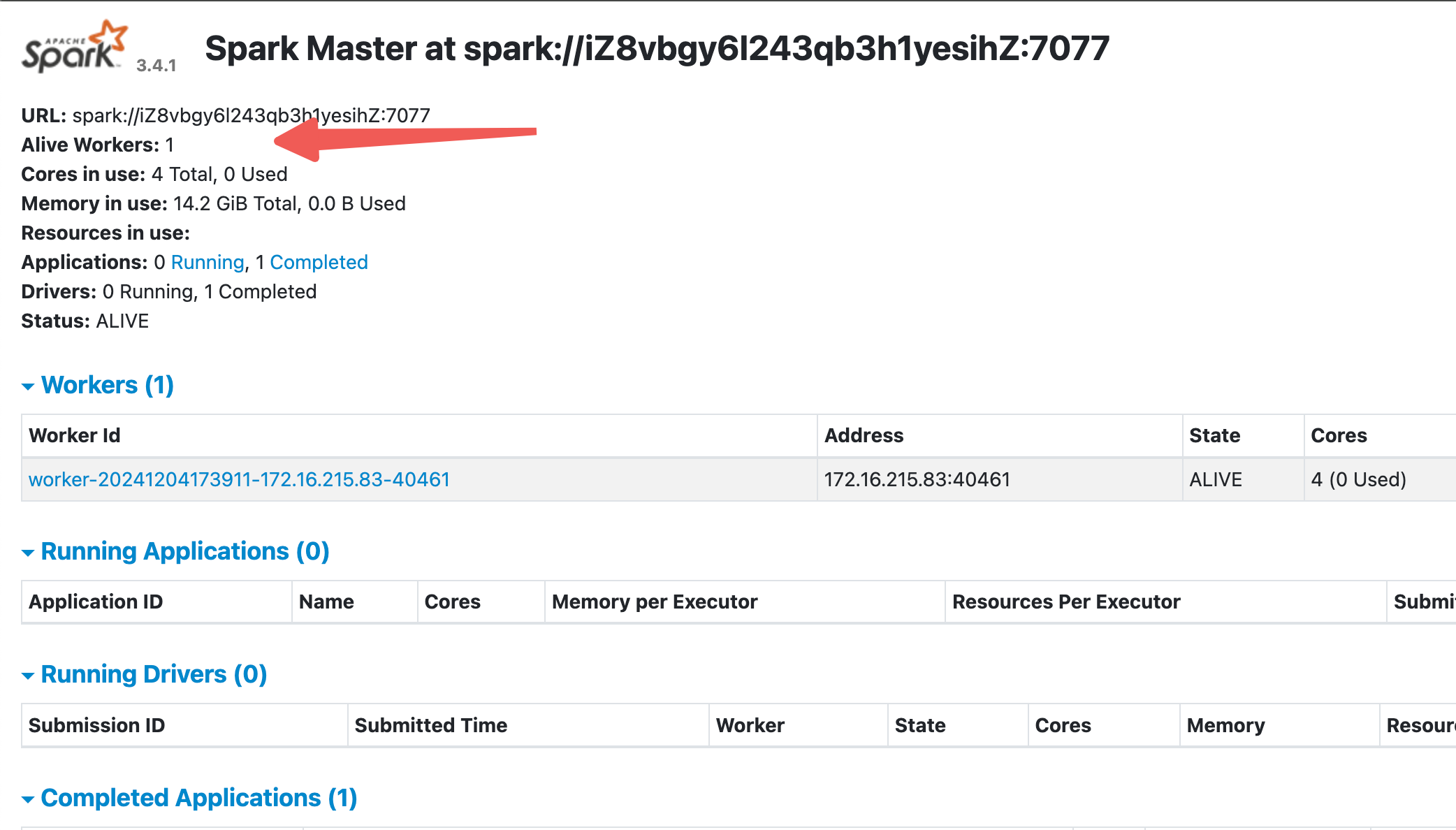
Check the worker node startup log
cd ~/zhiqingyun-agent/spark-min/logs
cat spark-ispong-org.apache.spark.deploy.worker.Worker-1-ispong-mac.local.out
Check whether the JAVA_HOME variable is configured in ~/.bashrc
tee -a ~/.bashrc <<-'EOF'
export JAVA_HOME=/opt/java
export PATH=$PATH:$JAVA_HOME/bin
EOF
source ~/.bashrc
java -version
Or start the worker manually
cd ~/zhiqingyun-agent/spark-min/sbin
bash start-worker.sh --webui-port 8081 spark://localhost:7077
Question 3: Spark’s Master and Worker services both start normally, but the job cannot be submitted 7077 cannot be accessed
25/07/31 09:31:02 INFO Utils: Successfully started service 'driverClient' on port 54587.
Exception in thread "main" org.apache.spark.SparkException: Exception thrown in awaitResult:
    at org.apache.spark.util.ThreadUtils$.awaitResult(ThreadUtils.scala:322)
    at org.apache.spark.rpc.RpcTimeout.awaitResult(RpcTimeout.scala:75)
    at org.apache.spark.rpc.RpcEnv.setupEndpointRefByURI(RpcEnv.scala:102)
    at org.apache.spark.rpc.RpcEnv.setupEndpointRef(RpcEnv.scala:110)
    at org.apache.spark.deploy.ClientApp.$anonfun$start$2(Client.scala:292)
    at scala.collection.TraversableLike.$anonfun$map$1(TraversableLike.scala:286)
    at scala.collection.IndexedSeqOptimized.foreach(IndexedSeqOptimized.scala:36)
    at scala.collection.IndexedSeqOptimized.foreach$(IndexedSeqOptimized.scala:33)
    at scala.collection.mutable.ArrayOps$ofRef.foreach(ArrayOps.scala:198)
    at scala.collection.TraversableLike.map(TraversableLike.scala:286)
    at scala.collection.TraversableLike.map$(TraversableLike.scala:279)
    at scala.collection.mutable.ArrayOps$ofRef.map(ArrayOps.scala:198)
    at org.apache.spark.deploy.ClientApp.start(Client.scala:292)
    at org.apache.spark.deploy.SparkSubmit.org$apache$spark$deploy$SparkSubmit$$runMain(SparkSubmit.scala:1020)
    at org.apache.spark.deploy.SparkSubmit.doRunMain$1(SparkSubmit.scala:192)
    at org.apache.spark.deploy.SparkSubmit.submit(SparkSubmit.scala:215)
    at org.apache.spark.deploy.SparkSubmit.doSubmit(SparkSubmit.scala:91)
    at org.apache.spark.deploy.SparkSubmit$$anon$2.doSubmit(SparkSubmit.scala:1111)
    at org.apache.spark.deploy.SparkSubmit$.main(SparkSubmit.scala:1120)
    at org.apache.spark.deploy.SparkSubmit.main(SparkSubmit.scala)
Caused by: java.io.IOException: Failed to connect to localhost/127.0.0.1:7077
    at org.apache.spark.network.client.TransportClientFactory.createClient(TransportClientFactory.java:284)
    at org.apache.spark.network.client.TransportClientFactory.createClient(TransportClientFactory.java:214)
    at org.apache.spark.network.client.TransportClientFactory.createClient(TransportClientFactory.java:226)
    at org.apache.spark.rpc.netty.NettyRpcEnv.createClient(NettyRpcEnv.scala:204)
    at org.apache.spark.rpc.netty.Outbox$$anon$1.call(Outbox.scala:202)
    at org.apache.spark.rpc.netty.Outbox$$anon$1.call(Outbox.scala:198)
    at java.util.concurrent.FutureTask.run(FutureTask.java:266)
    at java.util.concurrent.ThreadPoolExecutor.runWorker(ThreadPoolExecutor.java:1149)
    at java.util.concurrent.ThreadPoolExecutor$Worker.run(ThreadPoolExecutor.java:624)
    at java.lang.Thread.run(Thread.java:750)
Caused by: io.netty.channel.AbstractChannel$AnnotatedConnectException: Connection refused: localhost/127.0.0.1:7077
Caused by: java.net.ConnectException: Connection refused
    at sun.nio.ch.SocketChannelImpl.checkConnect(Native Method)
    at sun.nio.ch.SocketChannelImpl.finishConnect(SocketChannelImpl.java:716)
    at io.netty.channel.socket.nio.NioSocketChannel.doFinishConnect(NioSocketChannel.java:337)
    at io.netty.channel.nio.AbstractNioChannel$AbstractNioUnsafe.finishConnect(AbstractNioChannel.java:334)
    at io.netty.channel.nio.NioEventLoop.processSelectedKey(NioEventLoop.java:776)
    at io.netty.channel.nio.NioEventLoop.processSelectedKeysOptimized(NioEventLoop.java:724)
    at io.netty.channel.nio.NioEventLoop.processSelectedKeys(NioEventLoop.java:650)
    at io.netty.channel.nio.NioEventLoop.run(NioEventLoop.java:562)
    at io.netty.util.concurrent.SingleThreadEventExecutor$4.run(SingleThreadEventExecutor.java:997)
    at io.netty.util.internal.ThreadExecutorMap$2.run(ThreadExecutorMap.java:74)
    at io.netty.util.concurrent.FastThreadLocalRunnable.run(FastThreadLocalRunnable.java:30)
    at java.lang.Thread.run(Thread.java:750)
25/07/31 09:31:02 INFO ShutdownHookManager: Shutdown hook called
25/07/31 09:31:02 INFO ShutdownHookManager: Deleting directory /private/var/folders/4d/87h15bq14jq1lw22f_4bwrr80000gn/T/spark-3e8523e6-3ebc-4f85-b3c2-bacb9426b8dc
检查`~/zhiqingyun-agent/spark-min/conf`下的`spark-defaults.conf`文件中配置是否正确
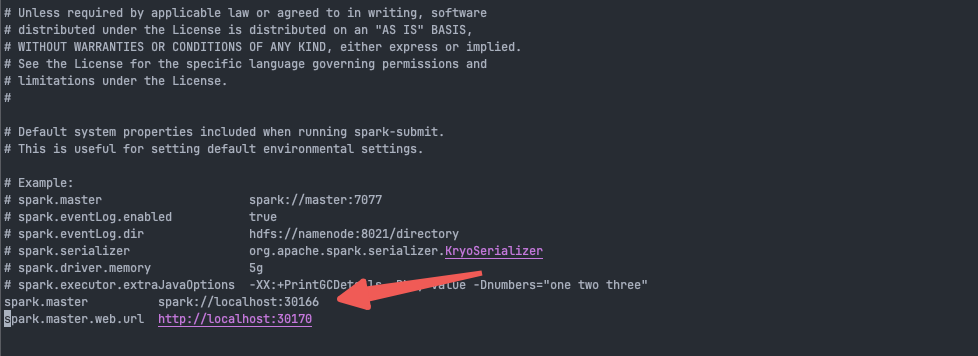
Solution
# 需要和`http://localhost:8081`的Spark URL保持一致
spark.master          spark://localhost:7077
# 需要和`http://localhost:8081`的访问地址保持一直
spark.master.web.url  http://localhost:8081
Question 4: Start the spark service independently
cd ~/zhiqingyun-agent/spark-min/sbin
bash start-master.sh --webui-port 30170 --host localhost --port 30166
bash start-worker.sh --webui-port 30168 --host localhost --port 30169 -c 12 -m 20g spark://localhost:30166

# 停止服务
bash stop-master.sh
bash stop-worker.sh
Modify spark configuration
vim ~/zhiqingyun-agent/spark-min/conf/spark-defaults.conf
spark.master          spark://localhost:30166
spark.master.web.url  http://localhost:30170
Spark Master startup command instructions
Options:
-i HOST, --ip HOST     Hostname to listen on (deprecated, please use --host or -h)
-h HOST, --host HOST   Hostname to listen on
-p PORT, --port PORT   Port to listen on (default: 7077)
--webui-port PORT      Port for web UI (default: 8080)
--properties-file FILE Path to a custom Spark properties file.
                       Default is conf/spark-defaults.conf.
Spark Worker startup command instructions
Options:
-c CORES, --cores CORES  Number of cores to use
-m MEM, --memory MEM     Amount of memory to use (e.g. 1000M, 2G)
-d DIR, --work-dir DIR   Directory to run apps in (default: SPARK_HOME/work)
-i HOST, --ip IP         Hostname to listen on (deprecated, please use --host or -h)
-h HOST, --host HOST     Hostname to listen on
-p PORT, --port PORT     Port to listen on (default: random)
--webui-port PORT        Port for web UI (default: 8081)
--properties-file FILE   Path to a custom Spark properties file.
                         Default is conf/spark-defaults.conf.
Problem 5: Job submission is stuck. Spark Standalone resources are queued, but the actual system resources are sufficient.
standalone中的内存和核心都是虚拟的,可以通过修改配置扩大内存和核心数。
Solution
vim ~/zhiqingyun-agent/spark-min/conf/spark-env.sh
# 最多推荐可配置当前核心数*2,比如16核心,可配置16*2个虚拟核心
export SPARK_WORKER_CORES=32
# 最多推荐可配置当前的内存数*2,比如16GB的内存,可配置16*2个虚拟内存
export SPARK_WORKER_MEMORY=32g
通过界面停止节点,并重新激活节点,让配置生效
Question 6: Error reported in node installation log
stop.sh:行2: $'\r':未找到命令
stop.sh: 第 5 行:cd: $'/tmp/zhiqingyun/bin\r': 没有那个文件或目录
stop.sh:行5: $'exit\r':未找到命令
stop.sh:行7: $'\r':未找到命令
stop.sh:行21: 语法错误: 未预期的文件结尾
Solution
使用windows打的包,无法直接部署到linux系统,需要对bash脚本中的/r做兼容
cd ~/zhiqingyun-agent/bin
sed -i 's/\r//g' start.sh
# 可手动启动节点
bash start.sh
# 也可通过界面激活
Question 7: Abnormality in io reading and writing data
首页监控基于sysstat工具实现
Installation command
sudo apt install -y sysstat
# or
sudo yum install -y sysstat
Question 8: Flink reports an error when running on a Kubernetes cluster
2025-08-19 09:44:13,095 WARN  org.apache.flink.runtime.security.modules.HadoopModuleFactory [] - Cannot create Hadoop Security Module due to an error that happened while instantiating the module. No security module will be loaded.
java.lang.NoClassDefFoundError: org/apache/hadoop/hdfs/HdfsConfiguration
    at org.apache.flink.runtime.security.modules.HadoopModuleFactory.createModule(HadoopModuleFactory.java:48) [flink-dist-1.18.1.jar:1.18.1]
    at org.apache.flink.runtime.security.SecurityUtils.installModules(SecurityUtils.java:73) [flink-dist-1.18.1.jar:1.18.1]
    at org.apache.flink.runtime.security.SecurityUtils.install(SecurityUtils.java:57) [flink-dist-1.18.1.jar:1.18.1]
    at org.apache.flink.runtime.taskexecutor.TaskManagerRunner.runTaskManagerProcessSecurely(TaskManagerRunner.java:531) [flink-dist-1.18.1.jar:1.18.1]
    at org.apache.flink.kubernetes.taskmanager.KubernetesTaskExecutorRunner.runTaskManagerSecurely(KubernetesTaskExecutorRunner.java:66) [flink-dist-1.18.1.jar:1.18.1]
    at org.apache.flink.kubernetes.taskmanager.KubernetesTaskExecutorRunner.main(KubernetesTaskExecutorRunner.java:46) [flink-dist-1.18.1.jar:1.18.1]
Caused by: java.lang.ClassNotFoundException: org.apache.hadoop.hdfs.HdfsConfiguration
    at jdk.internal.loader.BuiltinClassLoader.loadClass(Unknown Source) ~[?:?]
    at jdk.internal.loader.ClassLoaders$AppClassLoader.loadClass(Unknown Source) ~[?:?]
    at java.lang.ClassLoader.loadClass(Unknown Source) ~[?:?]
    ... 6 more
You need to upload
hadoop-HDFS-client.jarto the resource center, select thedependencytype, and add the dependency package in the job configuration
hadoop-hdfs-client.jar
下载地址: https://repo1.maven.org/maven2/org/apache/hadoop/hadoop-hdfs-client/3.3.5/hadoop-hdfs-client-3.3.5.jar
下载地址: https://repo1.maven.org/maven2/org/apache/hadoop/hadoop-hdfs-client/3.0.0/hadoop-hdfs-client-3.0.0.jar
Question 9: Custom port number
至轻云平台如果使用Standalone机群模式的时候,需要打开以下端口号
| Default port number | Description | Modification method |
|---|---|---|
| 8080 | Zhiqingyun platform access port number | Modify the platform yml configuration file server:port and restart the platform |
| 30177 | Zhiqingyun proxy port number | Install the node, the status is stuck waiting for activation, modify the Agent_port of the table SY_CLUSTER_NODE and the platform yml configuration file spark-yun: default-agent-port, keep the port number configuration consistent, restart the platform, and reactivate the node |
| 7077 | Standalone-spark-master | |
| 8081 | Standalone-spark-master-webui | |
| 8082 | Standalone-spark-worker-webui | |
| 8083 | Standalone-flink-master |
Standalone-spark custom port number
Stop the node first and modify the
INSTALL_SPARK_LOCALof the tableSY_CLUSTER_NODEto false. Turn off the spark online startup switch and start the spark service manually.
vim ~/zhiqingyun-agent/spark-min/conf/spark-env.sh
# 8082 -> 8085、8081 -> 8084、7077 -> 7078
export SPARK_MASTER_PORT=7078
export SPARK_MASTER_HOST=0.0.0.0
export SPARK_MASTER_WEBUI_PORT=8084
export SPARK_WORKER_HOST=0.0.0.0
export SPARK_WORKER_WEBUI_PORT=8085
vim ~/zhiqingyun-agent/spark-min/conf/spark-defaults.conf
# 8081 -> 8084、7077 -> 7078
spark.master          spark://0.0.0.0:7078
spark.master.web.url  http://0.0.0.0:8084
Manually start the spark service Manually shut down the service bash stop-all.sh
cd ~/zhiqingyun-agent/spark-min/sbin
# 8081 -> 8084、7077 -> 7078
nohup bash start-master.sh --host 0.0.0.0 --port 7078 --webui-port 8084 > /dev/null 2>&1 &
# 8082 -> 8085、7077 -> 7078
nohup bash start-worker.sh --host 0.0.0.0 --webui-port 8085 spark://0.0.0.0:7078 > /dev/null 2>&1 &
After reactivating the node, it can be used normally. You can only start and stop the spark service manually later.
Standalone-flink custom port number
Stop the node first
# 确保flink服务停止
cd ~/zhiqingyun-agent/flink-min/bin
bash stop-cluster.sh
# 日志如下:
# No taskexecutor daemon to stop on host ispong-mac.local.
# No standalonesession daemon to stop on host ispong-mac.local.
vim ~/zhiqingyun-agent/flink-min/conf/flink-conf.yaml
# 8083 -> 8087
rest.port: 8087
After reactivating the node, use it normally